
Rectangular prism; 10mm x 10mm x 37mm.
Made by sketching a 2D square and expanding it 3 dimensionally with the extrude tool
Fun fact! East Coast butter sticks are traditionally 4.8 inches long and 1.3 inches wide (~33mm x 33mm x 122mm) So this would be about ⅓ the size of a stick of butter even though the proportions are accurate.
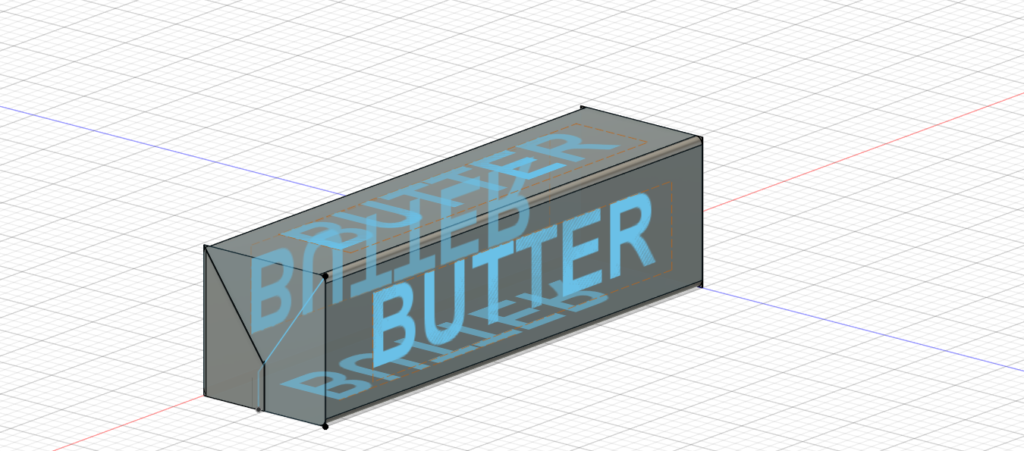
Transparent rectangular prism with folds on square ands and blue text “BUTTER” on surface of four rectangular sides.

Rectangular prism, paper texture with “BUTTER” extruded on rectangular surfaces.
In my high school architecture class I used Revit software to model buildings. This experience was similar, however, using my personal computer without a mouse made navigation significantly more challenging as I had to switch between tools with the arrow instead of using different features on the computer mouse like before. If I were to pursue a career that requires me to use this software, I would most definitely invest in a mouse (without whiskers). Another challenge was finding the tools in the first place. Many times I knew what I wanted to do but was unsure as to what general categories and specific tool names to use to carry out my agenda. When I surrendered and began consulting the platform’s AI assistant to find out where to look for the tools I needed, success! If my goal was to create an extraordinarily accurate stick of butter, as opposed to merely recognizable, I would try to fillet all of the edges of the prism – when I tried to select some of them, the computer would select the edges I had already blended. After 10 minutes of troubleshooting, I accepted defeat. After uploading the MTML model, I realized that the text was not visible. I tried extruding the letters more and coloring the faces. When I tried to color the letters, the whole surface would get selected. Molly and I gave it our best shot and after a while decided we had given it a great effort, the platform had an attitude and we did not want to play games anymore. Finally, if I were more proficient at Fusion I would have added more details and text to the stick (ie. tbs, #s, unsalted, grade AA).
By having accurate digital models of artifacts, objects, and things that exist in the world, both research and teaching will become more accessible and efficient. More people will be able to interact with a model of one thing from all across the globe, experience it up close, and use it for their research and educational purposes. That’s pretty cool!
Tips:
- Use a mouse if you have access to one
- Consult the platform’s AI Assistant if you can’t find a particular tool or are unfamiliar with its name
- Be patient and explore, even if you aren’t able to accomplish what you set out to do, you’ll learn a lot along the way and have more experience than when you started (which is the whole point)

Hey, Sylvie! I also had trouble navigating Fusion with the trackpad! If you ever need to use Fusion again while at Carleton, I would suggest going to a computer lab on campus; the big screen and the mouse really help with the navigation issue. Additionally, I also had a bit of trouble with trying to extrude certain parts of my 3D model but ended up selecting an entire surface. With more practice, I am sure we will get more adapted to the software. I really like that you added the little paper fold, and I appreciated the butter fun fact!
Thanks so much for the advice and encouragement Trixie! We got this!